Monday, September 26, 2011

Rip DVD movies and save to computer


You have a movie DVD! 

You recently bought a movie DVD, Sherlock Holmes, at Walmart, you want to have it on your computer or ipod or iphone or anywhere. Your goal now is to get that DVD quality of that movie into a digital format that you can view on anything. The fact is that you don't have to copy all the contents of the DVD and try to watch the movie from there. You can indeed save that movie, without compromising the quality, but in a much smaller size. So you can Rip a movie from DVD!

How do I rip a movie from the DVD?

You know what I am thinking about. A Tool to do the job. You're right you caught me. But let me share the tool I personally use to rip movies from DVD to AVI or MP4 or MOV or 3GP format preserving its high definition quality. It's ImTOO DVD Ripper, its a DVD ripper software for movie fans like you and me. Well there are freewares that can do this job, but I don't like to wait 2+ hrs to get the ripping process done. I would rather pay some $40 to get the professional tool to do the job, that has a team backing the tool, supporting and improvising it. I'd be glad to have my Sherlock Holmes movie ready to watch on ipad in 45 minutes including all the extras and special features. But you can exclude those as well.

I know I have done my research good in choosing a tool that saves my time. Ok enough of enough loving  my tool. I would keep loving it more whenever I rip a movie from a DVD. But that's me. I would recommend you to take your time, knowing about that tool, and giving it a try, after all we need to get things gone quickly and spend time watching it rather than waiting for freeware tools to take hours getting the same job done.

How to Rip a movie from DVD using Imtoo DVD Ripper?

Its time to put my favorite program to its test. How long does it take and what's the quality of the output?


From the image above its evident that ImTOO DVD Ripper has a very simple user interface and navigation.
The first step is choosing the profile. It can be iPod H.264 Video format. Choose the destination folder, like shown on the bottom of the program. You can add extra files like subtitles etc.. and get to ripping.You can as well choose the video resolution, sound quality and give it a name from the right-hand panel. The preview of the movie is shown in the preview box.


The above screen shows the progress of the ripping process. Looks like the 1 hr 32 min DVD is going to be ripped within 15 min at 720 x 576 screen size, with the audio AC3 6 channel output. Preview can be seen on the bottom-right. Looks like a pretty good job for watching it on iPad!

This is how I rip DVD movies and save to computer!


Monday, August 24, 2009

Podtastic back!

The podtastic blog which was dormant for a long period is now going to resume to post again! We have come back to contribute again! iPod has been a passion for us and for you since its inception. But i know we have disappointed a lot of subscribers providing with valuable hacks and tips that you can use. But now we are back, we will not go again. We have returned to our passion, which we loved doing!

So we are going to start with some thing new that you all are waiting to listen from us, about the iPod touch. Yes we are going to talk about that, and also cover how to how to resize your homemade video for the iPod, so that you can save on the Memory!

So this is gonna be up for the next topic!

Till then you pod! :D
A great euphonious in every box
Reblog this post [with Zemanta]

Tuesday, January 1, 2008

Peachpit Press Releases 4th Edition of 'The iPod Book"


The 4th Edition of "The iPod Book" is released by Peachpit Press.
Peachpit Press announced the immediate availability of The iPod Book: Doing Cool Stuff with the iPod and the iTunes Store, Fourth Edition on Friday. The new edition of Scott Kelby's iPod and iTunes Store guide explains how to use Apple's iPod touch, 3G nano, classic, and shuffle, how to get the most out of iTunes, using an iPod in your car, and more. The book is priced at US$19.99. [via]


who turned ipod box into a pandora's box ?

According to Greek mythology, pandora couldn't resist opening the box filled with evil, entrusted to her. So did Eve couldn't resist eating her bad apple according to the Bible.

Taking advantage of the curiosity and of course the lame store-policy, a bad apple somewhere in the chain between Apple and the Dealers warehouse, decided to play a prank on the ipod customers.

But the girl who found rocks in the ipod box, or the one who found some weird notes with some books, had known that it was a bad apple, could have saved her excitement and nevertheless a lot of trouble.

Yes, you read that right. In october, a 14 year old girl, Regan Ritter, of Texas who got set to rock when she opened her ipod box presented on her birthday, only found some rocks in it. Not the rock music. Just Rocks. Her mom who bought it at the rock-bottom price at Target got it replaced as soon as possible after demanding refund and getting rejected, but as you can probably guess, the second box was also stuffed with rocks. Target refused to refund her money and insisted to spend her $350 on other items. No word yet whether she got ipod since then.

Now, on the christmas day, a father from Washington D.C who decided to present her daughter with an iPod, again got hold of some bad apple's pandoras box. This time the girl, found a wacky note and some books on enlightment.

Well, that weird note read:

"Reclaim your mind the from the media shackles. Read a book and resurrect yourself. To claim your capitalistic garbage go to your nearest Apple Store."
The girl's dad thus returned the iPod to WalMart where he had initially purchased it, and received a full refund. Apparently, the WalMart store explained that this same thing had happened to another person, and that Apple is responsible for it. Yes, a Bad apple at Apple or somewhere in the chain between Apple and the Dealers Warehouse is having a few laughs turning iPod box into a Pandora's Box ? [via]

Thursday, November 22, 2007

iskin release new skin for ipod touch


iSkin releases a new skin (iSkin) for iPod touch - iSkin touch. Commited to premium ipod accessories, iSkin beautifully captures the essence of the ipod, safely covering and protecting all the ports and controls in a simple yet sophesticated design, without compromising on the usability or aesthetics.

The iSkin touch is made with the premium silicon material, encapsulating the ipod without adding extra bulk to it, while the front surface is covered with touch-friendly film protected screen (no adhesives, anti-glare and anti-fingerprint) with protection for menu button and an open for sensor area. There is also a privacy version of the screen film via their online store, sold separately.

The rear of the iSkin touch is slim with suregrip™ textured surface, features a removable rotary belt clip system called the revoclip3, that integrates seamlessly to keep you and your iPod connected. Remove the rotary clip for a more leaner look.

iSkin Touch protects both the iPod’s home and power buttons and features integrated port plugs that prevents dust and dirt from entering its docking and earphone ports whenever they are not in use.

Variety of two-tone designs to choose from, including NightHawk (espresso+black), Diablo (red+black), Oxygen (black+clear), Electra (black+blue) and Vanity (black+pink). The iSkin touch will retail for $29.99.


[via cg]

iSkin Online Store
iSkin Touch

Mugged at NYC iPod Touch Commercial


No, this is not an ipod touch commercial. But this is how a guy who got mugged at the Brooklyn, narrates...

I got mugged and beat up in Brooklyn last night. After filling out a police report, I came home and made this. Yes, I was really just beat up

Monday, November 19, 2007

win an iPod Touch!


Pals from Free Conference Calls (a Free facebook application from iotum inc) is holding a special Thanksgiving Holiday contest. Now before you get on the conference calls with your family members on account of 'Thanksgiving', try this Free Service, organize a Free Conference Call on facebook with your friends, family, business contacts, co-workers or study groups and be elligible to win a 8gb ipod Touch. Facebook users Apply. [Link]

"Stay in touch with family and friends this Thanksgiving holiday using FREE Conference Calls.
Just organize or join a FREE Conference Call between 12:01 AM on November 16th and 11:59 PM on November 25th. Each participant in a call lasting five minutes or longer will be automatically entered in the drawing. One lucky FREE Conference Call user will win a free 8Gb iPod Touch.
The winner will be contacted on December 1st."

Free Conference Calls on Facebook
Free Conference Calls, iotum Website
Facebook

Thursday, November 15, 2007

Steampunk iPod Skin


Checkout this new iPod skin from Gelaskins.

This steampunk iPod skin achieves a nice little trompe l'oeil effect of a cutaway window exposing the massive, bulky gears of your little MP3 player.
Steampunk Skin from Gelaskins

(Thanks Cory, via BoingBoing)

Tuesday, November 13, 2007

How To Reset A Frozen iPod

Now a DIY (Do It Yourself) Solution to help you save that hurry visit to your nearest Apple Store when your Ipod goes locked up or frozen, will probably become the next popular DIY.

This article explains in detail how you can reset your ipod. To Begin select your model from the list below (by clicking on the model name), and follow the instructions.


iPod Classic
------------

To reset your iPod classic:

1. Toggle the Hold switch on and off. (Slide it to Hold, then turn it off again.)
2. Press and hold the Menu and Select buttons until the Apple logo appears, about 6 to 10 seconds. You may need to repeat this step.

* Tip: If you are having difficulty resetting your iPod, set it on a flat surface. Make sure the finger pressing the Select button is not touching any part of the click wheel. Also make sure that you are pressing the Menu button toward the outside of the click wheel, and not near the center.

* If the above steps did not work, try connecting iPod to a power adapter and plug the power adapter into an electrical outlet, or connect iPod to your computer. Make sure the computer is turned on and isn't set to go to sleep.


iPod Shuffle
------------

To reset your iPod shuffle:

1. Eject your iPod shuffle from iTunes or your desktop, if connected.
2. Remove iPod shuffle from the USB port.
3. Move the switch on the back of iPod shuffle to the off position.
Tip: When iPod shuffle is off, the green stripe by the switch is not visible.
4. Wait 5 seconds.
5. Move the switch on the back to the play in order or the shuffle position. The green stripe will be visible in either position.

* iPod shuffle is now reset. If after resetting iPod shuffle you are going to attach it to your computer, be sure place the switch in the off position.


iPod shuffle (2nd generation)
-----------------------------

To reset your iPod shuffle (2nd generation):

1. Eject your iPod shuffle from iTunes or your desktop, if connected.
2. Remove iPod shuffle from the dock.
3. Move the power switch on the bottom of iPod shuffle to the off position.
4. Wait 5 seconds.
5. Move the power switch to the "on" position. The green stripe will be visible.

* iPod shuffle is now reset.


iPod mini | iPod nano | iPod nano (2nd generation) | iPod nano (3rd generation)
---------------------------------------------------------------------

To reset:

1. Toggle the Hold switch on and off. (Slide it to Hold, then turn it off again.)
2. Press and hold the Menu and Select buttons until the Apple logo appears, about 6 to 10 seconds. You may need to repeat this step.

* Tip: If you are having difficulty resetting your iPod, set it on a flat surface. Make sure the finger pressing the Select button is not touching any part of the click wheel. Also make sure that you are pressing the Menu button toward the outside of the click wheel, and not near the center.

* If the above steps did not work, try connecting iPod to a power adapter and plug the power adapter into an electrical outlet, or connect iPod to your computer. Make sure the computer is turned on and isn't set to go to sleep.


iPod with 'click wheel'
----------------------

To reset your iPod with click wheel:

1. Toggle the Hold switch on and off. (Slide it to Hold, then turn it off again.)
2. Press and hold the Menu and Select buttons until the Apple logo appears, about 6 to 10 seconds. You may need to repeat this step.

* Tip: If you are having difficulty resetting your iPod, set it on a flat surface. Make sure the finger pressing the Select button is not touching any part of the click wheel. Also make sure that you are pressing the Menu button toward the outside of the click wheel, and not near the center.

* If the above steps did not work, try connecting iPod to a power adapter and plug the power adapter into an electrical outlet, or connect iPod to your computer. Make sure the computer is turned on and isn't set to go to sleep.


iPod photo
----------

To reset your iPod with color display (also known as iPod photo):

1. Toggle the Hold switch on and off. (Slide it to Hold, then turn it off again.)
2. Press and hold the Menu and Select buttons until the Apple logo appears, about 6 to 10 seconds. You may need to repeat this step.

* Tip: If you are having difficulty resetting your iPod, set it on a flat surface. Make sure the finger pressing the Select button is not touching any part of the click wheel. Also make sure that you are pressing the Menu button toward the outside of the click wheel, and not near the center.

* If the above steps did not work, try connecting iPod to a power adapter and plug the power adapter into an electrical outlet, or connect iPod to your computer. Make sure the computer is turned on and isn't set to go to sleep.


iPod (5th generation)
---------------------

To reset your iPod (5th generation):

1. Toggle the Hold switch on and off. (Slide it to Hold, then turn it off again.)
2. Press and hold the Menu and Select buttons until the Apple logo appears, about 6 to 10 seconds. You may need to repeat this step.

* Tip: If you are having difficulty resetting your iPod, set it on a flat surface. Make sure the finger pressing the Select button is not touching any part of the click wheel. Also make sure that you are pressing the Menu button toward the outside of the click wheel, and not near the center.

* If the above steps did not work, try connecting iPod to a power adapter and plug the power adapter into an electrical outlet, or connect iPod to your computer. Make sure the computer is turned on and isn't set to go to sleep.


iPod Touch
-----------


To reset iPod touch, press and hold the Sleep/Wake button and the Home button at the same time until you see the Apple logo.


(Via apple.com/support/ipod/five_rs)

Saturday, April 21, 2007

manybooks.net - Get free ebooks in ipod notes format

Manybook.net is the digital repository of over 16,000 ebooks [still growing], in over 30 different languages, and available in almost every formats you can think of. And the best of all, You can download ebooks directly in the ipod notes format.

you can search for an ebook by the authors name, by its titles, by the language written, and browse through over 50 categories - Adventure, Audiobook, cooking, music, sexuality, non-fiction, romance, travel, short stories, health to name a few.

What's more ? you get the weekly movers and shakers, showing the top downloads of the week. you can also subscribe to its Rss feeds. Almost every categories, and topics can be subscribed via Rss.

Do you have a faint remembrance of that book's image , but couldn't recollect it's name or author ? no worries, just search for ebooks by its image cover to see the one you are looking for.

If you are stuck with choosing the ebook to download on your ipod, follow their random ebook pickings or head over to readers recommendation section, or see what books people have recently downloaded.

you can also share your views about the book you liked or downloaded, by writing a review, or just contributing to the current recommendations, with your top 5 favourites.

The library is more rich with Special collections and series collections. To stay updated with collections, you can subscribe to the rss feeds available.

The help section, has all the details on how to get the ebook on your ipod, or what readers you can use to view them on your desktop or if you have any additional queries not found on help section, you can also contact them directly.

As a whole, manybooks.net is one of the best online ebook library, that delivers ebook directly in the ipod notes format, which you never want to miss.

Friday, April 20, 2007

Free movies for your ipod

Great movies never leave our hearts, so should they do with your ipod. Now you can capture those best classical hits, as well as some cartoons such as Tom & jerry, and even better play them on your ipod. Public Domain torrents offers free movie downloads - Classic movies and B-Movies.

You can browse through from wide variety of movie categories - action, adventure, animation, comedy, drama, musicals, family, westerns, horror . . . .

These Movies come in all format you want, avi, mp4, google video, PDA, Playstation PSP or ZUNE, and IPOD video format. Every single movie comes with more than one option of downloading them, as you can see below, here the movie Jack London has three options, Pda, ipod and Psp.
When you click to download a movie, the movie file comes out as a torrent file. Save it. But before doing anything with it, You must have a torrent client installed to download your movie from that torrent thing. Bit comet, is widely used torrent client and it is free. you can then download the movie by opening the torrent file, bitcomet downloads the file.

If you have not downloaded any movies or any large files, it does take some 3-6 hours to download on broadband internet connection. If you are on a slow internet connection or want the movie delivered at your doorstep , you can get it shipped on DVD/CD for $1, add another $5 for shipping and handling.

If you like to download the file instead and unsure if you can play it on the ipod, the file format you are going to download, no worries, download a free ipod video converter that will do all the dirty work for you. But make sure the converter can handle the movie format you are going to download.

Ipod Video Converter [Direct Download : http://www.koyotesoft.com/appli/Setup_FreeIpodConverter.exe]

Tuesday, April 10, 2007

Converting Pdf to Ipod Notes

Converting Pdf files to ipod notes can be a tricky one, as we have to first convert the pdf file to text file, before converting it to ipod notes format.

Step 1:

Converting Pdf file to html:

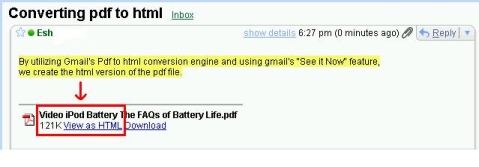
To do this, we utilize gmail’s free ‘pdf to html converter’ Engine. The trick is emailing yourself with the pdf file as an attachment. And then open the mail, find for the attachment file at the bottom, Click the link “View as HTML” to open the file in the new window or, Alternatively you can, Right click the link “View as HTML” and then save the file as html.

Here’s how to do it,

1. Compose a new message in Gmail (If you don’t have a gmail account, Get it now while it’s Free)

2. Enter your own email id in the ‘To’ field.

3. Attach the pdf file you want to convert. You can also attach more than one file, by Clicking the link “Attach another file”.

4. Now send the mail, and you’ll receive it immediately in the Inbox Folder.

5. Open the mail, and look for the attachment as shown below,


6. Now click the link “View as HTML”, the converted file opens in the new window, you can save it from the browser file menu. Or alternatively you can Right click the link “View as HTML” and save as html file within your inbox itself.

7. Note: when you click the “Download” link, the file is opened, just as an attachment, in the same pdf format.

Step 2:

Converting the HTML file to Ipod Notes Format:

Once the pdf file is converted into html file, the HTML file is again converted into text file using office package such as microsoft word. The text file is finally run through the ‘Ipod Notes Converter’ to get it in ipod notes format ready to upload to your ipod.

Here’s how to do it,

1.Open the HTML file in the Microsoft Word, and save it as a text file.
2.Now open the text file in the converter below, to finally convert it into ipod notes format.

Note: After uploading the file and clicking enter, you’ll be taken to a page within the ipod-notes website, where you can find the download file along with the installation instruction, to get it up and running on your ipod.


Convert text file to ipod Notes


Text file to upload:

Name of this file (make it short):

Press
to upload your file and get it in ipod notes format.


Powered by iPod-Notes


Friday, February 16, 2007

Using ipod to read ebooks

A free converter tool that makes it possible by allowing us to convert our ebooks or other textual materials into ipod notes format, hence we can read it on our ipod.

Daniel Duris, the creator of this script has this to say,

“This utility/PHP script loads large text file and splits it into notes for use on iPod. It is easy to read your book in plain text format on your iPod via Notes functionality. All notes will be automatically linked, so you can move from one to another with absolute ease. It’s as simple as turning pages of the book.”

Although many converter programs/softwares has sprung up, the ease of this free ebook-converter-tool is astounding. Though this news has already been a year old or more, but it still remains as an effective go-to tool.

Let's Create our ipod ebook now,

Head over to ipod-ebook-creator. Choose your ebook or any text material. Make a text file(*.txt) version of it (ie. Copy all your ebook content into your notepad and save it). Now in the converter tool area, browse for the created *.txt file, name it and upload. Next download the zip file the converter has made. Assuming that you are using itunes, make sure you have enabled the 'disk mode'. To do that, if you aren't, go to edit >> preferences >> general, select 'Enable disk use'.

Now unzip the entire folder into your ipod notes folder/partition. Now, after unplugging the ipod from your computer, go to Extras >> notes.

The file appears on top with the name you chose along with the number suffix (eg.file001), open it. At the end of the file you find a link that will automatically navigate to the next part/page of your ebook in the folder.

That's it ! you are done.

Well, if you want to read a webpage on your ipod, before saving it as a text file, visit ipod-notes.com, where you can convert a webpage directly to ipod notes format by just entering the web page url.

If you don't have enough ebooks, just browse through project gutenberg for library of free books.

You can also head over to digitalbookindex.com to browse through the catalog by authors, subjects or publishers. These ebooks come in variety of formats (html, pdf, ptiff, txt). Download necessary readers, if you cannot access the files. If you are unsure of any file formats, you can always get a free reader just by searching for it in the search engines.

If you rather prefer to get the ebooks directly in the ipod notes format, head over to manybooks.net, which has over 15,000 of free ebooks.


Friday, December 8, 2006

Welcome to my ipod blog

Hi,

Welcome to my ipod blog. Here you'll find tips on how to get most out of your ipod. Here i'll be sharing my ipod experiences as well as cool tweaks and hacks. From ipod accessories to interfacing issues, from itunes to audio enhancing, from remote accessability to free downloads centers, from podcasts to ipod DJ-ing....you name it.....